App Installation
The official resource repository is continuously updated with new and fun apps, helping you expand the capabilities of Firefly T1. It's designed for photography enthusiasts and players — no programming required, just download a ready-made app and get started.
App Library
The official resource repository is continuously updated with the latest apps for Firefly T1. Browse the complete app list and downloads here:
Installing Apps
1. Download an App
Open the app library, choose an app and download it.
2. Connect to Computer
Connect Firefly T1 to your computer using a USB cable. After a few seconds, a new USB drive will appear.
3. Add the App
- Drag the downloaded app file into the
/appsfolder on the USB drive
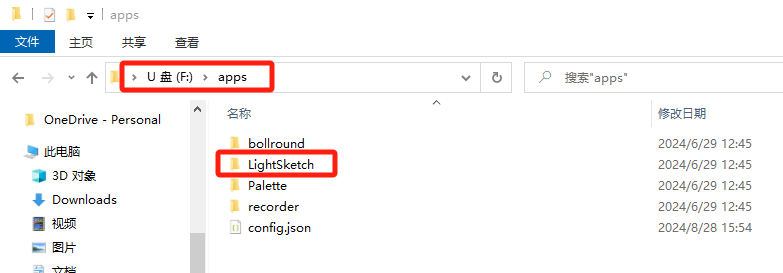
4. Register the App
- Open
apps/config.jsonon the USB drive with a text editor
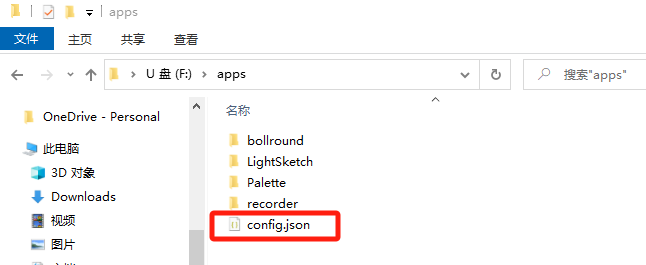
- Add the new app information to
config.json
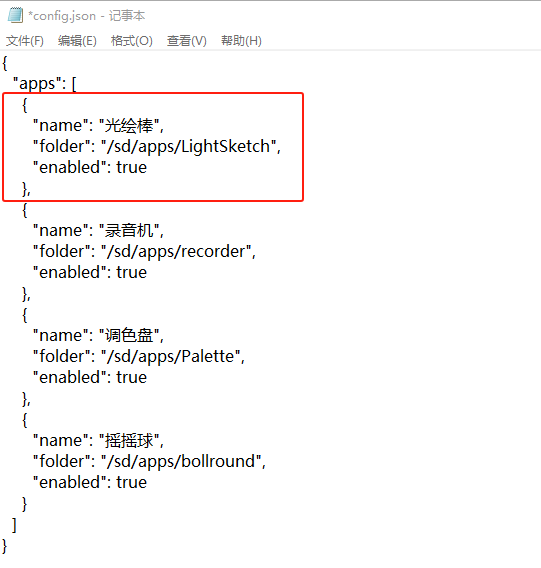
Each app entry includes:
"name": App name"folder": App folder path"enabled": Whether the app is enabled
- The
config.jsonfile must be updated for the app to appear on the device - The order of entries determines the display order
5. Launch the App
After successful configuration, power on the Firefly T1, navigate with the joystick, and press the center button to launch your new app!
Go Further: Build Your Own App
The apps above already cover most use cases. If you want to go one step further and create truly your own apps, head over to the App Development section to learn how to write, package, and share your custom apps — starting from setting up the environment.