Compatible LEDs & Wiring Guide
The Beetle S1 drives LED strips through the XT30(2+2) output port. The XT30 output is a direct 3S (3-series) Li-ion battery output (approximately 9V–12.6V, nominal 11.1V), capable of driving 12V WS2815 strips.
Supported Types
WS2815 LED Strips (12V) ★ Recommended
The primary compatible LED type for the Beetle S1. WS2815 is a 12V-powered addressable strip where each LED can be controlled independently for color and brightness. It supports break-point continuation, making it ideal for long-distance, high-power light painting and large light installations.
| Specification | Description |
|---|---|
| Voltage | 12V |
| Signal protocol | WS2815 (compatible with WS2811/WS2812 data protocol) |
| Advantage | Lower voltage drop with 12V power, more stable over long distances, supports break-point continuation |
WS2812 LED Strips (5V) — Requires a 12V→5V Module
The S1's XT30 output is a 3S Li-ion battery voltage (approximately 9V–12.6V), so it cannot drive 5V WS2812 strips directly. A dedicated 12V→5V converter module will be available in the future, allowing the XT30 port to support 5V WS2812-type strips and rings. Until the module is released, use an external 5V power supply for WS2812.
The S1's currently recommended LED type is 12V WS2815.
XT30(2+2) Output Pinout
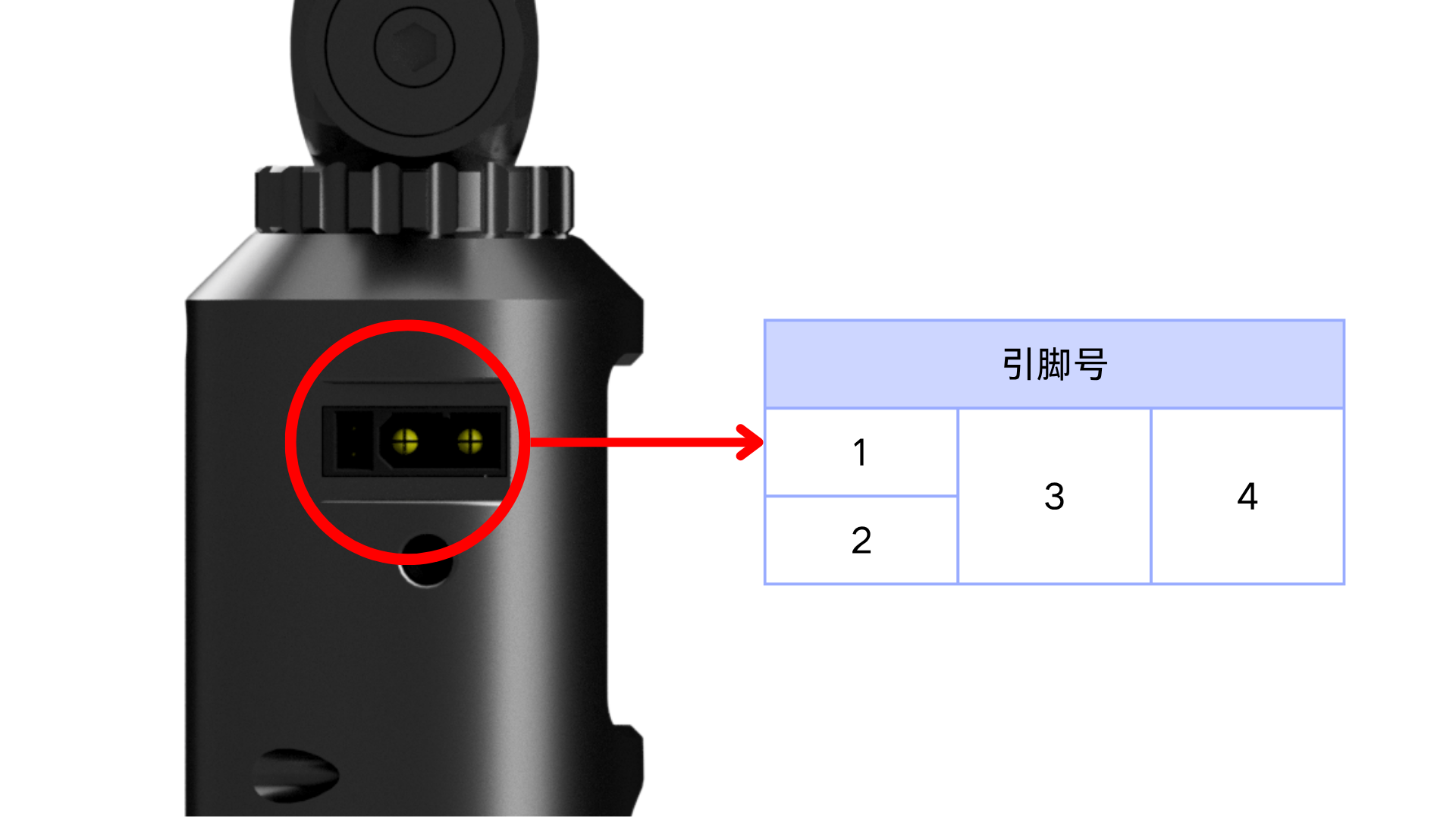
The S1's XT30 main output contains 2 high-current power terminals and 2 signal terminals (both internal GPIOs, allowing any signal definition).
| Pin | Terminal | Signal | Description |
|---|---|---|---|
| 1 | Signal 1 | GPIO | Control signal (internal GPIO, any signal) |
| 2 | Signal 2 | GPIO | Control signal (internal GPIO, any signal) |
| 3 | High-current - | GND | Power ground |
| 4 | High-current + | 3S battery | Power positive (direct 3S Li-ion output, approx. 9V–12.6V) |
Wiring Steps
Common Pins
Addressable strips (such as WS2815) usually only need three pins wired:
| Pin | Name | Description |
|---|---|---|
| Power | 12V / VCC | Power positive |
| Signal | DIN / DI | Data signal input |
| Ground | GND | Power ground |
Wiring Method
The S1 comes with an XT30 adapter cable — just connect the strip to the XT30 output port. Wiring is very straightforward:
| Beetle S1 (XT30) | WS2815 LED Strip |
|---|---|
| High-current + (3S battery) | 12V / VCC (power) |
| Signal 1 / Signal 2 (GPIO) | DIN / DI (signal) |
| High-current - (GND) | GND (ground) |
Wiring Steps
- Make sure the Beetle S1 is powered off
- Plug the XT30 adapter cable into the S1's XT30 output port
- Connect the other end to the WS2815 strip's 12V, DIN, and GND pins
- Check the wiring, then power on to light up the strip
Shopping Recommendations
- Light Painting: A high-density 144 LEDs/m WS2815 strip is recommended; 12V power provides more stable, finer light trails
- Light Painting Wand Kit: Best with the official S1 light painting wand kit
- Large Installations: The S1's 3S Li-ion high-power output drives longer and more strips
- WS2812 Users: Wait for the official 12V→5V module, or use an external 5V supply
Precautions
- Make sure the LED voltage is 12V (currently recommended: WS2815)
- 5V WS2812 strips cannot connect directly to the XT30 output; use a 12V→5V module or external power
- The S1 supports high-power output; still allow for heat dissipation when running high-density, long strips for extended periods
- Power off the device before wiring; avoid plugging/unplugging while powered
- The XT30 connector is keyed — do not force reverse connection